news
Ask ChatGPT about your broadband bill. It now asks us.

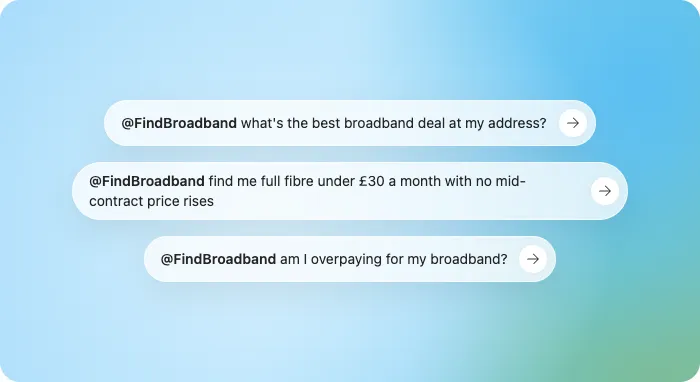
Most households now ask an AI assistant the questions they used to ask a search engine. What to do with the leftover chicken. Whether the MOT garage is having them on. Why the boiler makes that noise in November. And, increasingly, whether their broadband bill is too high, which is the one question the assistant has been answering with total confidence and a comparison page it read in 2023.
From today it can read ours instead.
FindBroadband now has what is called an MCP endpoint. MCP stands for Model Context Protocol, which is the industry's name for a plug socket. It lets an AI assistant ask our system a question and get back the same answer the website would give, live, rather than a guess assembled from whatever it found on the open internet last year.
The assistant gets four things it can do. It can look up the addresses at a postcode. It can pull the deals available at one of those addresses. It can check whether what you pay now is more than you need to. And it can open up the details of a single deal, including the bits the headline price leaves out. That is the whole list. There is no account to create and nothing to pay.
It works in ChatGPT, where it is a plugin you install once and then just talk to. It works in Claude, in Cursor and in anything else that speaks MCP. Behind it sit 29 providers and about 460 live deals, refreshed every day.
The assistant is not allowed to do the calculations.
That sounds like a small technical decision. It is the whole product. An AI is very good at sounding certain and not so good at multiplying £26.99 by 24 while remembering the £4 rise next April. So we do not let it. It reads our numbers rather than guessing its own. The whole-contract cost, the April rises and the overpaying verdict all come from the same code that runs the website, and the assistant passes them on. If it tells you a deal saves £131 over two years, that is our number. If it tells you we could not beat your bill, that is our number too.
And here is the thing. Nothing is sold inside the chat. When you pick a deal, the assistant sends you to findbroadbanddeals.com to switch, where the price you saw is the price you get. The chat is where you work out what to do. The switch happens somewhere that has to put the price in writing.
In ChatGPT, open the FindBroadband plugin page and press Install plugin. That is the whole setup.
In Claude, open Settings, then Connectors, then Add custom connector and paste this link:
https://www.findbroadbanddeals.com/api/mcp/claude
Then ask it something a real person would ask. "I'm with Sky paying £44 a month for 100Mb at LS11 5AA. Am I overpaying?" It will find the address, pull what is available there, work out where you stand and tell you the number, whichever way it goes. Ask it for the cheapest full fibre at that address next, or for the fastest deal under £30, and it will keep going.
Cursor and any other assistant that supports MCP connect with this link instead:
https://www.findbroadbanddeals.com/api/mcp/standard
If you would rather not involve an assistant at all, the check on the site asks the same three questions and gives the same verdict.
Because the household asking the assistant at nine on a Tuesday evening was always going to get an answer. Since July roughly one in four switches made through this site has started with a ChatGPT recommendation, which puts it level with Google, and every one of those people was working from whatever the assistant remembered about our pages. The only question was whether the answer had anything to do with their address. Now it does.
Anyway. Ask it about your bill. If it says you are fine, you are fine. If it says you are not, the switch is one click away, and the number it quoted will still be the number when you get there.
More from the blog
Browse all guides →
The Dorset areas still stuck without full fibre
Dorset averages 72.2% full fibre, but eight of its villages are still stuck at zero. This is who is missing out, why they are last and what residents can do about it.
What Ofcom is doing this quarter
Ofcom's spring changes explained: complaints can go to the ombudsman after six weeks, automatic compensation now pays £10.34 a day and the five-year Openreach rulebook is set. What each change means for your broadband bill.

Where altnets are rolling out next
Altnets now cover 19.7 million UK premises and 2026 is the year of infill, mergers and subsidised rural builds. Here is where CityFibre, Netomnia and Hyperoptic are building next and why a postcode check beats any map.

Mergers, buyouts and CEO churn
UK broadband consolidation accelerated in 2026 with a £2bn Netomnia deal, reported sales of Hyperoptic and Community Fibre and a wave of altnet CEO departures. Here is what each move means for your contract.
Compare at your address
See deals at your address
Drop in your postcode for the live shortlist, speeds, prices, and which providers actually reach your line.